The short answer
Pick monday.com if you want the lowest starting price and want to lay out your own board from scratch, with columns and statuses that fit an unusual process. Pick Asana if you want task dependencies and guest collaboration on its cheapest paid plan, with recurring tasks and basic time tracking already included for free. Pick Asana too if you want project work to roll up into a portfolio and a company goal, at a lower plan tier than monday needs for its closest equivalent. Both companies publish clear pricing and security pages, and both are more capable than a first glance suggests. The differences below come down to which plan unlocks which feature, not one product being simpler than the other. Read on for normalized pricing at three team sizes, a full feature-by-plan matrix, and which one should you choose for seven concrete buying situations.
At a glance
| What you need | Winner | Why |
|---|---|---|
| The cheapest way to start | monday Basic | Lower per-seat price, but it skips Timeline and Gantt views, guest access, and API access |
| Task dependencies on a low-cost plan | Asana Starter | monday needs its costlier Pro plan for the same feature; Asana’s time tracking sync is already free on Personal |
| Cross-project reporting at the lowest price | monday Pro | A 20-board dashboard costs less per seat than the Asana plan needed for the same reach |
| A portfolio formally tied to a company goal | Asana Advanced | Goals connect directly to grouped projects, one tier below Asana’s top plan |
| Automation with no monthly action limit | Asana, any paid plan | monday caps automated actions between 250 and 25,000 a month depending on plan |
| Flexible boards for work that is not tasks and projects | monday, any plan | Columns and statuses can represent almost any process without translation |
The biggest difference
Asana organizes work in a stack. A task can sit inside a project, and a project can sit inside a portfolio, which can connect to a company goal. Asana’s features page describes this directly. A task does not have to belong to a project, though. Asana’s My Tasks is a personal list where a person can add a task on its own. Asana’s help center covers how that works. The portfolio and goal layers are optional, but they sit inside Asana’s core structure, and unlimited portfolios and goals become available on the Advanced plan.
monday works differently. A monday board holds rows called items, and a team groups and sorts them with columns it defines itself. monday’s own developer reference describes a board as made of “items (rows), groups (groups of rows), and columns.” monday does not build a “portfolio” into its structure the way Asana treats projects and portfolios. Instead, monday’s pricing page confirms two separate ways to see several boards at once. Every paid plan includes a dashboard that combines a set number of boards: 1 on Basic, 5 on Standard, 20 on Pro. A dedicated Portfolio management feature, with health and risk tracking across projects, is available on the Enterprise plan only.
In practice, Asana’s portfolio-and-goals view sits on Advanced, one plan below its top tier. monday’s dedicated Portfolio management sits only on Enterprise, its top tier, with three lower paid plans that do not include it. If a 20-board dashboard is enough for a team’s reporting needs, though, monday’s Pro plan already covers a similar need at a lower price than Asana’s Advanced plan.
How each product organizes work
Both products start from the same idea: something needs to get done, and someone needs to see the bigger picture it belongs to. They differ in how many levels sit between those two things.
Asana has four levels. A task is the smallest unit of work. A project groups related tasks and can be viewed as a list, board, calendar, timeline, or Gantt chart, all according to Asana’s features page. A portfolio groups related projects. A goal connects a portfolio, or several, to a company objective. A task never has to climb past its own level, since My Tasks lets someone track work without creating a project first.
monday has three levels, defined more loosely. An item is a row on a board, similar to a task. A board groups related items into groups, which act like a status or a category, using columns a team designs itself. Above a board, monday offers a combined dashboard rather than a fixed higher-level object, pulling data from several boards into one view. monday’s developer reference confirms this three-part structure of items, groups, and columns.
The practical effect: a team whose work fits neatly into tasks, projects, and cross-project goals will find Asana’s structure already matches how it thinks. A team whose work does not fit that mold, such as a sales pipeline with unusual stages, can design a monday board around it directly, without translating it into tasks and projects first.
Daily work: views, dependencies, and collaboration
The view types on offer are close. Asana supports list, board, calendar, timeline, and Gantt-chart views. monday supports Kanban, timeline, Gantt, and calendar views, according to monday’s features page. Both tie their more advanced views, Timeline and Gantt, to a paid plan above their free tier.
Task dependencies mark which piece of work is blocked by another. Asana confirms dependencies on its Starter plan and up, stating on its pricing page that they let a team “see what’s blocked and what’s ready to move forward.” monday confirms dependencies through “advanced columns” that create “dynamic dependencies between tasks,” but only on its Pro plan, two tiers above its cheapest paid plan.
Recurring work is free on Asana, not a paid-plan perk. Asana confirms recurring tasks that repeat “on a specific day, periodically, or within a custom time frame” on every plan, including the free Personal plan. Neither monday’s pricing page nor its features page names a recurring-item feature outright, so this comparison does not claim monday lacks one, only that neither page calls it out the way Asana’s does.
Time tracking splits into two tiers on Asana. Syncing with an outside time-tracking tool is free, included on Personal and up. Native tracking that compares estimated versus actual time requires Advanced. monday puts its own time tracking on Pro, two tiers above its cheapest paid plan, tied to the same “advanced columns” that unlock dependencies.
Forms and documents exist on both sides. Asana confirms Forms for standardized work intake starting on Starter. monday’s features page names “monday workforms” and “monday work docs” as platform capabilities, though neither monday page states which paid plan includes them. Asana separately confirms Notes, for project notes and meeting minutes, on every plan, including the free Personal plan.
Guest collaboration is where the two plans diverge most clearly. Asana confirms unlimited free guest seats starting on Starter. monday’s pricing page confirms guest access starting one tier later, on Standard, describing guests as “external users who can only access boards you invite them to.”
Automation and templates
Asana’s Rules feature runs on triggers, actions, permissions, and branching logic. Asana’s help center documents each of these as a separate topic, though the exact list of available triggers and actions was not fully readable during this review. Asana states no published monthly cap on how many Rules actions an account can run, on any paid plan. Asana also offers 80 ready-made project and task templates, a different kind of starting point: a template fills in a project or task, not an automation rule.
monday’s automation engine works from ready-made recipes, pre-built combinations of a trigger and an action that a team can turn on immediately, described by monday as letting a team “easily set up code-free automations.” That convenience comes with a limit: monday caps automated actions at 250 a month on Standard, rising to 25,000 a month on Pro and 250,000 on Enterprise.
Both companies have recently pushed AI into this area. monday’s product updates show several 2026 releases aimed at building automations by describing them in plain language, including an “MCP Block for AI Workflows” and managing automations through an assistant called Sidekick. Asana’s AI Studio serves a similar purpose: a no-code automation builder that can “intake requests, classify and route tasks, and send alerts.” Its monthly credit allowance ranges from 50,000 on Starter to 200,000 on Enterprise.
Reporting and planning: dashboards, portfolios, and workload
Asana’s reporting page states plainly which plan unlocks which report. Project dashboards need Starter. Reports across several projects need Advanced. Asana also confirms a dedicated Workload feature, letting a manager see team capacity across projects, measure effort by task count, hours, or points, and set a maximum weekly workload limit. Asana’s workload page states this is available on “Advanced plans, Enterprise, and Enterprise Plus.”
monday’s dashboards support four widget types: Chart, Numbers, Battery, and Gantt, plus AI-generated summaries. monday’s pricing page states how many source boards a dashboard can combine by plan: 1 on Basic, 5 on Standard, 20 on Pro, and 50 on Enterprise. A dedicated Portfolio management feature, with health and risk tracking, is an additional Enterprise-only capability on top of that 50-board dashboard. monday’s features page references a team-availability dashboard image, which hints at a capacity-planning view, but no dedicated Workload-style feature comparable to Asana’s could be found or confirmed on monday’s accessible pages.
Current AI features and limits
Asana names four AI capabilities on its AI page. AI Teammates are more than 30 prebuilt assistants for functions like marketing, operations, and IT. Asana Dash is described as an AI chief of staff that routes work and surfaces priority actions from meetings, Slack, and email. AI Studio is the no-code automation builder covered above. AI Connectors let a team work from ChatGPT, Claude, Gemini, or similar tools without leaving the conversation. Usage is limited: Asana’s pricing page states 5 AI Teammate or Dash requests per user a month, capped at 50 requests per account on Starter and Advanced and 250 on Enterprise. Asana also sells prepaid AI request packs at $0.50 each and an on-demand plan at $5.99 per user a month plus $0.60 per request.
monday bundles its AI features by plan rather than by named assistant. monday’s pricing page lists 3 AI tools and 1,000 AI credits a month on Basic, 5 tools and 2,000 credits on Standard, and 6 tools and 3,000 credits on Pro. monday’s free plan has no AI features at all. monday’s product updates show monday investing heavily in AI-driven automation recently, including a conversational assistant called Sidekick and an MCP integration block that connects third-party AI tools to a monday account.
Both companies changed their AI offerings enough in 2026 that a specific credit count or tool list could shift again; treat these figures as a snapshot rather than a permanent ceiling.
Pricing by team size
Here is what each plan costs for three realistic team sizes, based on Asana’s pricing page and monday’s pricing page, both checked in September 2026 and billed annually.
| Plan | Price per seat, per month | 5-person team, per year | 10-person team, per year | 25-person team, per year |
|---|---|---|---|---|
| Asana Starter | $10.99 | $659 | $1,319 | $3,297 |
| Asana Advanced | $24.99 | $1,499 | $2,999 | $7,497 |
| monday Basic | $9 | $540 | $1,080 | $2,700 |
| monday Standard | $12 | $720 | $1,440 | $3,600 |
| monday Pro | $19 | $1,140 | $2,280 | $5,700 |
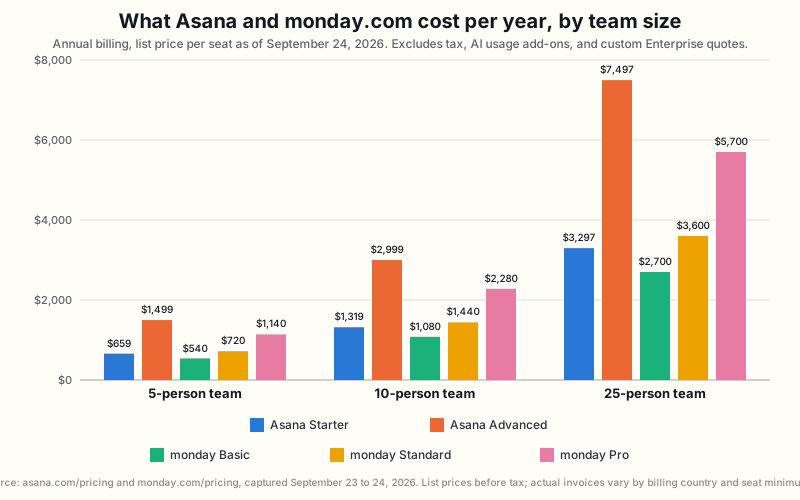
The gap grows with team size because both products charge per seat. Asana’s Starter plan already includes an uncapped amount of automation, dependencies, and every core view, including Timeline and Gantt. Matching that same set of features on monday costs more: Standard is needed for those views, and automated actions are still capped at 250 a month there. monday’s Basic plan is cheaper than Asana Starter, but Basic does not include Starter’s views, dependencies, or uncapped automation, so the two are not a like-for-like purchase.
These totals are simple math: the monthly per-seat price times 12 months times the number of seats. Asana does not publish a minimum number of seats for a paid plan. monday’s paid plans start at a 3-seat minimum and are sold in seat buckets above that; the exact bucket sizes above 3 were not confirmed. All three team sizes used here, 5, 10, and 25 people, sit well above that minimum, so it does not change the totals shown.
What actually changes at each price point
This table lists the specific features most likely to change which plan a team actually needs to buy, not just which plan is cheapest on paper.
| Feature | Asana | monday |
|---|---|---|
| Task dependencies | Starter and up | Pro and up, through advanced columns |
| Time tracking | Third-party sync free on Personal and up; native tracking at Advanced and up | Pro and up only |
| Recurring tasks | Confirmed on every plan, including free Personal | Not named on public pricing or feature pages; plan tier unconfirmed |
| Forms | Starter and up | monday workforms exists; plan tier unconfirmed |
| Notes and documents | Notes (project notes, meeting minutes) on every plan, including free Personal | monday work docs exists; plan tier unconfirmed |
| Guest access | Unlimited free guests, Starter and up | Standard and up |
| Workload or capacity view | Advanced, Enterprise, and Enterprise Plus | No confirmed dedicated feature |
| Cross-project dashboard | Universal reporting, Advanced and up | 1 board (Basic), 5 (Standard), 20 (Pro), 50 (Enterprise) |
| Dedicated portfolio feature | Portfolios and Goals, Advanced and up | Portfolio management, Enterprise only |
| AI usage limits | 5 requests per user a month, capped at 50 to 250 per account by plan | 1,000 to 3,000 AI credits a month by plan; none on Free |
| Single sign-on and provisioning | SAML and SCIM named at Enterprise | “Enterprise security” and multi-level permissions named at Enterprise; SCIM not named |
| Full account export | Organization-wide JSON export, included on Enterprise Plus or as a paid add-on on standard Enterprise | No confirmed bulk export or backup feature found |
Integrations and portability
Asana’s developer documentation describes a REST API, webhooks, App Components for embedding inside Asana’s own interface, OAuth for apps that work across several workspaces, and personal access tokens for testing. Asana’s app directory organizes integrations into categories such as AI, Communication, Finance and HR, and Security and Compliance, but does not state a total integration count anywhere in its visible page content.
monday’s pricing page is more specific about day-to-day API access. It states an exact number of calls allowed per day by plan: 1,000 a day on Standard, 10,000 on Pro, and 25,000 on Enterprise. No API access is listed on Free or Basic. monday’s API changelog shows an actively maintained platform. monday’s general API reference confirms the API can read board data and import data from another source programmatically. Neither company’s own app directory or app marketplace states a total number of available integrations, so this comparison does not use either company’s own integration-count claims.
Portability is the sharpest asymmetry in this section. Asana documents a full organization export, described on Asana’s pricing page as “a complete JSON backup of your entire Asana organization, including all projects, tasks, comments, and custom fields.” That export is not simply part of standard Enterprise pricing, though. Asana’s plan comparison marks it included by default only on Enterprise Plus. On standard Enterprise, it is a separate, named “Compliance management” add-on instead. No accessible monday.com or developer.monday.com page describes a comparable bulk export or full-account backup at any price. That gap is recorded here as not found, not as proof monday lacks the feature, since the support-center articles most likely to describe a board-level export return an access error to automated review.
Administration and security
Security certifications and regulatory compliance claims are two different things, and this comparison keeps them separate. A certification means an outside auditor checked the company and issued a report, such as SOC 2 or the ISO 27001 family. Compliance with a law such as GDPR or HIPAA is the company’s own claim that it follows that law, not a certificate from an auditor.
Asana’s trust center lists SOC 2 Type 2, SOC 3, the ISO 27001 family, and CSA STAR Level 1 as certifications, alongside claims of HIPAA, GDPR, and CCPA compliance. It also states global data residency in the EU, Australia, and Japan, and lists SAML authentication and SCIM user provisioning as Enterprise-plan features on Asana’s pricing page.
monday’s trust center lists a comparable set of certifications, including SOC 1, SOC 2, SOC 3, the ISO 27001 family, CSA STAR, and TX RAMP. Its compliance list is wider, naming the UK GDPR, the Australian Privacy Act, Canada’s PIPEDA, Brazil’s LGPD, and Japan’s APPI, in addition to GDPR, CCPA, and a HIPAA business associate agreement. monday’s Enterprise plan names “enterprise security” and multi-level permissions, but its public pricing page does not use the term SCIM the way Asana’s does.
Neither trust center states which specific plan unlocks single sign-on; that detail comes from each company’s pricing page instead.
Choose Asana if
- You want task dependencies and unlimited guest seats on the cheapest paid plan, rather than spread across several tiers. Recurring tasks and time-tracking sync with outside tools are already free before you pay anything.
- You want several projects to roll up into a portfolio and a company goal, at a lower plan tier than monday needs for its closest equivalent.
- You want to know exactly which plan unlocks which level of reporting. Asana states this directly: single-project dashboards need Starter, reporting across several projects and a dedicated Workload view need Advanced.
- You want an automation feature with no published monthly limit on how many actions it can run.
- Your company needs single sign-on and automatic user provisioning by name. Asana’s pricing page names SAML and SCIM as Enterprise features.
- You need a documented way to export your entire account, not just a single board, for backup or migration purposes. Getting it means paying for Enterprise Plus, or adding Asana’s Compliance management add-on.
Choose monday if
- You want the lowest starting price, and a 1-to-5-board dashboard on Basic or Standard covers as much cross-project reporting as your team needs.
- Your workflow does not fit neatly into tasks and projects. A sales pipeline or a content calendar with unusual stages can go straight onto a monday board.
- You want ready-made automation recipes you can turn on immediately, instead of building rules from scratch, and your automation volume fits comfortably under monday’s monthly action caps.
- Your company needs to meet privacy rules outside the United States and Europe. monday’s trust center lists compliance with Canadian, Brazilian, and Japanese privacy laws that Asana’s trust center does not mention.
- You want a 20-board combined dashboard for cross-project visibility at a lower price than the Asana plan that offers similar reach.
Scenario verdicts: which product wins for your team
Each row below is a specific, common buying situation, the better fit for that situation, and the condition that would flip the verdict the other way.
| Scenario | Winner | Why | What would reverse it |
|---|---|---|---|
| A 5-person team wants the cheapest way to start today | monday | Basic costs about $540 a year versus about $659 for Asana Starter | Needing Timeline, Gantt, guests, or API access forces a move to monday Standard, which costs more than Asana Starter |
| A 10-person team wants dependencies and some form of time tracking, without the priciest plan | Asana | Dependencies need Starter; time-tracking sync with outside tools is already free on Personal; monday needs its costlier Pro plan for both | Wanting time tracking built natively into Asana, not synced from an outside tool, needs Advanced, and monday Pro then bundles both features for less |
| A growing team wants one view across several projects on a budget | monday | A 20-board Pro dashboard costs less per seat than Asana Advanced | Wanting a company goal formally tied to grouped projects, not just a combined dashboard, favors Asana Advanced instead |
| A team wants automation with no monthly action cap | Asana | No published cap on any paid plan, versus monday’s 250 to 25,000 a month | Automation volume that comfortably fits under monday’s cap reduces Asana’s advantage |
| A company needs named single sign-on and user provisioning | Asana | SAML and SCIM are named explicitly on Asana’s Enterprise plan | A confirmed but unpublished SCIM offering from monday’s sales team would close this gap |
| Work is a sales pipeline or content calendar, not tasks and projects | monday | Boards and columns adapt to almost any process without translation | Needing that pipeline formally grouped into a portfolio tied to a goal favors Asana, or hits monday’s Enterprise-only Portfolio feature |
| A company wants to back up or migrate its entire account | Asana | A documented organization-wide JSON export exists, on Enterprise Plus or as a paid add-on on Enterprise | An unpublished monday export feature, confirmed directly with monday support or sales, would close this gap |
Migration and lock-in
Moving data into either product is not the concern this review can fully answer: neither company’s accessible pages describe a bulk import wizard in enough detail to compare import fidelity. monday’s API reference does confirm a path for “importing data from another source programmatically.” A technically capable team, or a partner, can use that path to move data in through the API rather than a manual import screen.
Getting data back out is where the two differ most. Asana documents a complete organization export in JSON format, covering every project, task, comment, and custom field, described on Asana’s pricing page as built “for data backup, compliance, and system integration.” That export comes included by default only on Enterprise Plus, one tier above standard Enterprise; a standard Enterprise account needs to add Asana’s separate “Compliance management” package to get it. No accessible monday.com or developer.monday.com page describes an equivalent one-click export of an entire account, at any price. This does not mean monday cannot export data at all. Board-level export options are common in tools like this. But the specific support articles most likely to confirm one return an access error to automated review, so this comparison records the point as unresolved rather than as a confirmed gap.
A buyer planning to migrate away from either product later should confirm export options directly with the vendor’s sales or support team. The same goes for a buyer who needs a compliance-grade backup on a recurring basis, rather than relying on marketing pages alone.
Limitations and methodology
This comparison uses only information published by Asana and monday.com themselves: pricing pages, trust centers, feature pages, developer documentation, and product-update pages, checked in September 2026. A few facts came from monday’s support center, which returns an access error to automated review; those were checked by hand instead and are marked as a manual check in our source records.
Two things could not be independently confirmed anywhere in either company’s accessible public materials. First, the total number of integrations either company offers; both app directories omit an aggregate count, and this comparison excludes both companies’ own marketing claims about it rather than repeat an unverified number. Second, whether monday offers a bulk account export or backup feature comparable to Asana’s; this is recorded as not found, not as a confirmed absence.
We did not test either product by hand, so nothing here is a claim about how the software feels to use day to day. Every price, plan limit, and feature claim above traces back to a first-party page from Asana or monday.com, dated in this article.
Read the complete Asana review or the complete monday.com review for more detail on each product by itself. This comparison follows the sourcing rules described on our methodology page.
Frequently asked questions
Does either product have a free plan? Yes. Both cap their free plan at 2 people. Asana’s free Personal plan includes unlimited tasks and projects with basic views. monday’s free plan caps out at 3 boards and includes no AI features, which start on monday’s paid Basic plan.
Which one is cheaper for a 10-person team? monday Basic costs less on paper, about $1,080 a year versus about $1,319 for Asana Starter. Basic does not include dependencies, guest access, Timeline or Gantt views, or API access, so the comparison only holds if a team does not need those features yet.
Do either of these tools support single sign-on on a lower-cost plan? No. Both companies reserve single sign-on for their top-tier Enterprise plan, priced by custom quote rather than a published per-seat rate.
Which one has stronger AI features right now? Asana names more distinct AI capabilities, including AI Teammates, Asana Dash, and AI Studio, with published usage limits at every plan tier. monday bundles AI tools and credits by plan instead of naming separate assistants, and has shipped several AI-automation updates recently through its Sidekick assistant. Neither company’s free plan includes AI features beyond monday’s complete absence of any.
Does monday really have no minimum seat count listed on its main pricing page? Correct. The 3-seat minimum is confirmed on a monday support-center article, not the main pricing page, so a buyer relying only on monday.com/pricing would not see it there.
I am still not sure which one to choose. What should I do? Try both companies’ free plans on your actual workflow before paying for either one. A hands-on trial will surface fit issues, such as an unusual board layout or a missing view, faster than any comparison article can.
Can I move my data out of Asana or monday.com if I switch later? Asana documents a complete organization export, included on Enterprise Plus or available on standard Enterprise as a paid add-on. monday’s API confirms a way to read and import data programmatically. No accessible monday page describes an equivalent one-click full export. That point is unresolved rather than ruled out, and worth confirming directly with monday before committing.