Asana is a task-and-project platform built around a structured hierarchy: tasks sit inside projects, projects can roll up into portfolios, and portfolios can connect to company goals. Automation, custom fields, and cross-project reporting are layered on top as a team moves up the plan ladder. This review covers what Asana actually includes at each plan, what it costs for real team sizes, and which kind of buyer it suits. It uses only Asana’s own published pricing, product, security, and developer documentation, dated in this article.
The short verdict
Asana suits a team that wants a defined structure for its work and plans to use more than one view of that work. It is ready to pay a per-person price once the team grows past two people. It is a weaker fit for a team that expects a free plan to support real collaboration, or a team that wants heavy AI usage without tracking a monthly request cap.
| Type | Team profile | Why |
|---|---|---|
| Best fit | A small team ready to pay Starter pricing from day one | Dependencies, uncapped automation, and every core view arrive on the cheapest paid plan |
| Best fit | A growing team that needs to report across several projects | Portfolios and goals connect grouped projects to a company objective, from Advanced |
| Best fit | A regulated company that needs named security controls | SAML and SCIM are named explicitly on the Enterprise plan |
| Poor fit | A pair or small group that needs more than 2 free seats | The free Personal plan is capped at 2 users with no bridge plan below Starter |
| Poor fit | A team planning to run AI Teammates or Dash constantly | Requests are capped per account, not just per user, at every plan tier |
| Poor fit | A workflow that does not break into tasks and projects | Asana’s structure has to be adapted to fit unusual processes like a sales pipeline |
Who Asana is best for
Asana is best for a small or growing team that is willing to organize its work as tasks inside projects. It also wants dependencies, guest collaboration, and unlimited automation from its first paid plan, rather than spread across several tiers. Recurring tasks and time-tracking sync with outside tools come free on every plan. It also suits a team that expects to report across more than one project eventually. The portfolio-and-goals layer that supports that is part of Asana’s core structure, not a bolt-on feature, and it becomes available one plan below Asana’s top tier.
A company with formal compliance requirements is also a good match once it reaches Enterprise pricing. Asana names SAML authentication and SCIM user provisioning explicitly at that tier. A documented full-organization data export is also available for backup or migration purposes, though it takes Enterprise Plus, or a paid add-on on top of standard Enterprise, to get it.
Who should avoid Asana
A pair or very small group that cannot pay for a paid plan should look elsewhere. Asana’s free Personal plan is capped at 2 users, with no lower-cost paid tier between that cap and the full Starter price. A team whose work is naturally a flexible board, such as a sales pipeline or a content calendar with unusual stages, has a harder fit here. It needs to adapt Asana’s task, project, and portfolio structure to fit that process, rather than the other way around.
A team planning to lean heavily on AI Teammates, Asana Dash, or AI Studio should also look closely at the request caps before committing. Those caps apply per account, not just per user, so a team that shares AI usage across many people can exhaust its monthly allowance faster than a per-seat cap would suggest.
How Asana organizes work
Asana’s structure has four levels. A task is the smallest unit of work, with an owner and a due date. A project groups related tasks and can be viewed as a list, board, calendar, timeline, or Gantt chart, according to Asana’s features page. A portfolio groups related projects together. A goal connects a portfolio, or several, to a company objective.
A task does not have to climb past its own level. Asana’s help center confirms that My Tasks is a personal list where someone can add a task on its own, without first creating a project. This matters for a new user’s first session. A single person can start tracking their own work immediately, then grow into the project and portfolio layers only when the team actually needs to coordinate across more than one list.
Unlimited portfolios and goals become available on the Advanced plan. Below that, a team can still use projects and tasks fully, but it cannot connect multiple projects to a shared company objective inside the product itself.
Setup and the learning curve
This review did not test Asana hands-on, so nothing here is a claim about how fast or easy setup feels in practice. What can be said from Asana’s own documentation is what a new team has to learn and configure.
A new user’s simplest path is My Tasks, a personal list that needs no project setup first. Building out team-level structure takes more decisions. A project needs a view choice: list, board, calendar, timeline, or Gantt. A growing team eventually has to decide how to group projects into portfolios if it wants cross-project reporting.
Asana ships 80 ready-made templates for common workflows, plus a template builder for creating custom ones. Project templates are available on every plan, including the free plan. Task templates need Starter and up. Building a custom project or task template needs Advanced and up. A team that adopts a ready-made template skips designing a process from scratch; a team that needs a custom one has to pay for a plan that includes that capability first.
Tasks, projects, views, and dependencies
Asana confirms five view types on its features page: list, board, calendar, timeline, and Gantt chart. The free Personal plan includes list, board, and calendar views only. Timeline and Gantt views require the Starter plan or above, according to Asana’s pricing page.
Task dependencies, which mark that one task is blocked by another, are confirmed starting on Starter. Asana’s pricing page describes them as letting a team “see what’s blocked and what’s ready to move forward.” Recurring tasks are free from the start: a task can repeat “on a specific day, periodically, or within a custom time frame” on every plan, including the free Personal plan.
Guest collaboration is confirmed at Starter and up, with unlimited free guest seats. Asana also confirms a Notes capability, for project notes, meeting minutes, and other documentation kept alongside the work itself, on every plan, including the free Personal plan. A team that specifically needs dependencies or guest collaboration should budget for Starter as the effective entry plan; a team that just needs recurring tasks and notes already has both for free.
Templates, rules, and automation
Rules is Asana’s automation feature, built from triggers, actions, permissions, and branching logic. Asana’s help center lists rule triggers, rule actions, rule permissions, and branching as separate topics. The exact catalog of available triggers and actions inside each topic was not fully readable during this review. What is confirmed directly is that Asana states no published monthly cap on how many Rules actions an account can run, on any paid plan.
Templates are a related but different tool: a template fills in a project or task with a starting structure, while a rule automates an ongoing action. Asana’s 80 ready-made templates, covered above, are project and task templates, not automation rules.
AI Studio adds a third layer: a no-code automation builder that can “intake requests, classify and route tasks, and send alerts.” Its monthly credit allowance scales from 50,000 on Starter to 75,000 on Advanced and 200,000 on Enterprise. A team that wants automation with no volume ceiling should rely on Rules. A team that wants an AI-driven builder for more complex intake and routing logic should budget for AI Studio credits on top of its plan price.
Reporting, dashboards, portfolios, goals, and workload
Asana states plainly which plan unlocks which level of reporting. Asana’s reporting page confirms project dashboards at Starter and up, and portfolio dashboards plus universal, cross-project reporting at Advanced and up. Dashboards support six chart types (column, line, burn-up, donut, number, and lollipop), pull data from tasks, projects, or goals, and support date-range filtering with click-through to the underlying items.
Portfolios and goals sit at the center of Asana’s cross-project story. A portfolio groups related projects, and a goal connects that portfolio to a company objective. Both are available at Advanced and up.
Workload is a separate, dedicated capacity feature. Asana’s workload page states it lets a manager see team capacity across projects, measure effort by task count, hours, or points, and set a maximum weekly workload limit for a person. It requires “Advanced plans, Enterprise, and Enterprise Plus,” matching the other cross-project reporting features at that tier.
A team that only needs to track one project at a time can do that fully on Starter. A team that wants to see workload, portfolio health, or goal progress across more than one project needs to budget for Advanced.
Time tracking
Asana confirms two levels of time tracking. Syncing with an outside time-tracking tool is free, included on the Personal plan and up. Advanced and up add native, built-in time tracking with estimated-versus-actual comparisons. A team that is fine pairing a third-party time-tracking tool with Asana does not need to pay anything for that; a team that wants time tracking built into the product itself needs Advanced.
Administration, permissions, security, and governance
Asana’s trust center lists a set of security certifications, independently audited by outside firms. These include SOC 2 Type 2, SOC 3, the ISO/IEC 27001 family (27001:2022, 27017:2015, 27018:2019, 27701:2019), and CSA STAR Level 1. Separately, Asana states compliance with HIPAA, GDPR, and CCPA and other state privacy laws. A certification means an outside auditor checked the company and issued a report. A compliance claim is the company’s own statement that it follows a given law, not a certificate from an auditor; the two should not be weighed the same way when comparing vendors.
The trust center also states data residency options in the EU, Australia, and Japan, and enterprise controls including two-factor authentication, single sign-on, SAML 2.0, and integrations for data loss prevention, archiving, and eDiscovery. The trust center does not say which plan unlocks which control. Asana’s pricing page fills that gap for the two most consequential admin controls: SAML authentication and SCIM user provisioning are both named specifically as Enterprise-tier features. A company that needs single sign-on or automatic user provisioning as a hard requirement should budget for Enterprise, not Advanced.
Integrations, API, import, and export
Asana’s developer documentation describes a REST API, webhooks, OAuth for apps that work across several workspaces at once, App Components for embedding directly inside Asana’s interface, and personal access tokens for testing. Asana’s app directory organizes integrations into categories such as AI, Communication, Finance and HR, IT and Development, and Security and Compliance. The page does not state a total integration count anywhere in its visible content. A marketing page elsewhere on Asana’s site claims a specific integration-count lead over a named competitor. That figure comes from Asana’s own competitive messaging rather than the app directory itself, so this review does not repeat it.
On data portability, Asana documents a complete organization export. The pricing page describes it as “a complete JSON backup of your entire Asana organization, including all projects, tasks, comments, and custom fields for data backup, compliance, and system integration.” This is a concrete answer to a question many buyers ask late in the process: whether they can get their data back out in bulk if they switch tools later. It is not a plain Enterprise-plan default, though. Asana’s own plan comparison marks the export included by default only on Enterprise Plus, one tier above standard Enterprise. On standard Enterprise, it is a separate, named “Compliance management” add-on instead. Below Enterprise, Asana’s public materials do not describe an equivalent bulk-export feature, so this review does not assume one exists at lower tiers.
AI features and limits
Asana’s AI page names four capabilities. AI Teammates are more than 30 prebuilt assistants for functions like marketing, operations, and IT, with additional industry-specific Teammates for manufacturing, retail, professional services, and healthcare. Asana Dash is described as an AI chief of staff that routes work and surfaces priority actions from meetings, Slack, and email. AI Studio is the no-code automation builder covered above. AI Connectors let a team work from ChatGPT, Claude, Gemini, or similar tools without leaving the conversation.
Usage is limited at every plan. Asana’s pricing page states 5 AI Teammate or Dash requests per user a month, capped at 50 requests per account on Starter and Advanced and 250 on Enterprise. That account-wide ceiling matters more than the per-user number for a team that shares AI usage broadly. A 10-person team on Starter shares the same 50-request account cap as a 2-person team on the same plan. Asana also sells prepaid AI request packs at $0.50 each, and an on-demand plan at $5.99 per user a month plus $0.60 per request, for usage beyond the included allowance.
Plans and pricing
Here is what each plan includes, based on Asana’s pricing page, checked in September 2026.
| Plan | Price | Seat minimum | Who it’s for |
|---|---|---|---|
| Personal | Free, capped at 2 users | Not applicable | Individuals or pairs trying the product |
| Starter | $10.99 per user a month billed annually ($13.49 billed monthly) | None published | Small teams that need dependencies, automation, and every core view |
| Advanced | $24.99 per user a month billed annually ($30.49 billed monthly) | None published | Teams that need portfolios, goals, Workload, and native time tracking |
| Enterprise | Custom, contact sales | None published | Organizations that need SAML, SCIM, and universal reporting |
Asana’s public pricing page does not state a minimum seat count for Starter or Advanced. The per-user price applies from the first paid seat.
Annual cost by team size
The free plan cannot support a real team past 2 people, so Starter is where most buyers actually start paying. Here is what Starter and Advanced cost at three team sizes, billed annually.
| Plan | Price per seat, per month | 5-person team, per year | 10-person team, per year | 25-person team, per year |
|---|---|---|---|---|
| Starter | $10.99 | $659 | $1,319 | $3,297 |
| Advanced | $24.99 | $1,499 | $2,999 | $7,497 |
| Enterprise | Custom | Not modeled; contact sales | Not modeled; contact sales | Not modeled; contact sales |
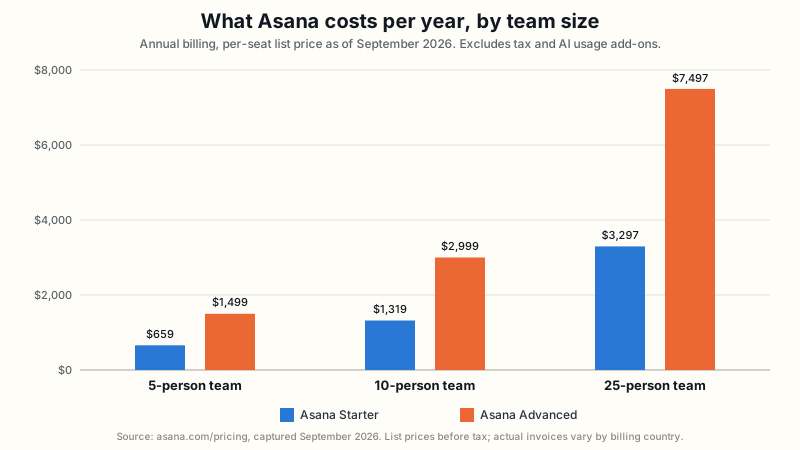
These totals are simple math: the monthly per-seat price times 12 months times the number of seats. The gap between Starter and Advanced grows with team size because both are priced per seat, and Advanced costs more than double Starter’s per-seat rate. That gap buys portfolios, goals, Workload, native time tracking, and a higher AI Studio credit allowance, not just a higher number attached to the same feature set.
Plan limits and upgrade triggers
This table lists the specific features most likely to affect which plan you actually need to buy, based on what each plan includes rather than its price alone. Most rows force an upgrade; a couple are flagged below as already free, so you know not to pay for them by mistake.
| Feature | Plan required | What changes |
|---|---|---|
| Task dependencies | Starter and up | Not available on the free Personal plan |
| Timeline and Gantt views | Starter and up | Personal ships list, board, and calendar only |
| Recurring tasks | Free, every plan | Not an upgrade trigger; included from Personal onward |
| Guest collaboration | Starter and up | Unlimited free guest seats once unlocked |
| Third-party time tracking | Free, every plan | Not an upgrade trigger; syncing with an outside tool is free from Personal onward |
| Native time tracking | Advanced and up | Adds estimated-versus-actual comparisons |
| Portfolios and goals | Advanced and up | Cross-project rollups do not exist below this tier |
| Universal cross-project reporting | Advanced and up | Project-only dashboards are all that Starter offers |
| Workload capacity view | Advanced and up | Also available on Enterprise and Enterprise Plus |
| Custom project and task templates | Advanced and up | Starter includes task templates, but not custom ones |
| Automated actions | Uncapped on every paid plan | No plan-based ceiling on Rules volume |
| AI Teammate and Dash requests | Capped by account at every plan | 50 per account on Starter and Advanced, 250 on Enterprise |
| SAML and SCIM | Enterprise only | Single sign-on and automatic provisioning require the top tier |
| Full organization export | Enterprise Plus, or Enterprise with a paid add-on | Standard Enterprise needs the separate “Compliance management” add-on to get it |
Strengths
- Dependencies, guest collaboration, and uncapped automation all arrive on Starter, Asana’s cheapest paid plan, rather than being spread across several tiers. Recurring tasks and time-tracking sync with outside tools are already free before you pay anything.
- A genuinely connected structure, tasks inside projects inside portfolios connected to goals, that scales to reporting across many projects, not just within one.
- A broad, independently audited security certification set (SOC 2, SOC 3, the ISO 27001 family, CSA STAR) with multi-region data residency, which matters for regulated buyers.
- A documented full-organization export, giving a concrete answer to a data-portability question many buyers ask only after they have already committed to a tool, available at Enterprise Plus or as an add-on on standard Enterprise.
- A wide set of named AI capabilities, from prebuilt AI Teammates to a no-code automation builder, all confirmed on Asana’s own AI page.
Weaknesses and recurring frustrations
- The free Personal plan’s 2-user cap means almost no real team can use Asana for free; the practical entry price is the Starter per-user rate.
- Portfolio-level reporting, goals, and Workload, the capabilities that most benefit a growing, cross-functional team, all sit behind the Advanced plan, at more than double Starter’s per-seat price.
- AI Teammates and Asana Dash are capped by account, not just by user, which can bottleneck a team that shares AI usage broadly across many people.
- The full-organization export is easy to assume comes free with Enterprise. It does not: standard Enterprise needs a separate, paid “Compliance management” add-on, and only Enterprise Plus includes it by default.
- The specific catalog of triggers and actions behind Asana’s Rules feature could not be fully read from its help center during this review. A team cannot fully compare that catalog to another product’s automation engine before signing up.
- Asana’s public materials do not state an aggregate integration count. Asana’s release notes page also did not return dated entries during this review, so no release-cadence claim is made here either.
Recommendation by scenario
| Scenario | Recommendation | Reversal condition |
|---|---|---|
| A small team wants quick adoption without paying for features it does not need yet | Starter | If the team already knows it needs cross-project reporting soon, planning for Advanced from the start avoids a full seat-count re-price later |
| A growing, cross-functional team needs repeatable reporting across projects | Advanced | If the team never needs to see more than one project at a time, Starter remains the cheaper, sufficient choice |
| A regulated company needs single sign-on and automatic user provisioning | Enterprise | If the company can manage users manually and does not need SAML or SCIM by name, Advanced covers most other governance needs at a lower price |
| A team wants to compare realistic cost, not headline pricing | Treat Starter’s roughly $1,319 a year for a 10-person team as the real entry cost | The free Personal plan only works if the team stays at or under 2 people permanently |
| A team plans to use AI Teammates or Dash constantly across many people | Model the 50-request account cap before committing to Starter or Advanced | If AI usage will be light or occasional, the account cap is unlikely to bind in practice |
Alternatives to Asana
monday Work Management is the closest direct alternative reviewed on this site. It organizes work as boards made of items with columns a team defines itself, rather than Asana’s fixed task-project-portfolio structure, which suits a workflow that does not fit neatly into tasks and projects. monday’s cheapest paid plan, Basic, costs less per seat than Asana Starter. But it does not include dependencies, guest access, or Asana Starter’s full view set. Matching those features on monday requires its Pro plan, which costs more per seat than Asana Starter. The complete monday.com review and the Asana versus monday.com comparison cover this tradeoff in full, including normalized pricing at several team sizes.
ClickUp is also compared against Asana on this site, but its own pricing and feature evidence has not yet been independently verified for a standalone review, so no specific ClickUp claim is repeated here. Check back on this site’s project management category hub as that research is completed.
Final recommendation
Asana is a strong choice for a team that wants a structured, hierarchical way to organize work. It should be ready to pay Starter pricing to get dependencies, guest access, and uncapped automation together on one plan; recurring tasks and time-tracking sync with outside tools are already included for free. It becomes an even stronger choice for a team that expects to report across more than one project. That capability is part of Asana’s core structure, not a separate add-on, and it is available one plan below Asana’s top tier.
It is a weaker choice for a team that needs more than 2 free users, or for a workflow that does not naturally break into tasks and projects. It is also a weaker choice for a team planning constant, broad AI usage without first modeling Asana’s account-wide request caps. Buyers in any of those situations should read the alternatives above before committing.
Sources, methodology, and limitations
This review uses only information published by Asana itself: its pricing page, trust center, features page, reporting page, workload page, AI page, developer documentation, app directory, and help center articles, all checked in September 2026. No hands-on product testing was performed for this review. Nothing here should be read as a hands-on usability, speed, or performance finding.
Two things could not be independently confirmed from Asana’s accessible public materials. First, the total number of integrations Asana offers; the app directory lists categories but no aggregate count, and this review excludes Asana’s own marketing claim about it rather than repeat an unverified number. Second, the exact catalog of triggers and actions behind the Rules automation feature. Asana’s help center documents that such a catalog exists as a set of topics, but the specific content behind those topics was not retrievable during this review.
This review follows the sourcing rules described on our methodology page. Every price, plan limit, and feature claim above traces back to a first-party Asana page dated in this article.