The short answer
Choose ClickUp if you want the most features for the lowest price per person and you are happy to learn a deeper product. Choose monday.com if you want to design boards column by column, or if you want AI tools included in the plan price. The single biggest difference is how each tool charges for growth. ClickUp lets a team buy one seat at a time, starts at $7 per user per month billed yearly, and sells AI as an extra. monday sells seats in a set of steps, starts at $9, and includes AI in every paid plan.
For teams of 5 to 25 people, ClickUp’s entry plan costs less per year than monday’s. Its top self-serve plan costs the same as monday’s middle plan and less than monday’s top one. Once ClickUp’s AI add-on is included, monday can cost less. The rest of this page explains why, and which team should pick which. Read the pricing table first if cost decides your choice. Every price and plan limit below comes from each vendor’s own pages, checked in September 2026. We did not test either product by hand.
At a glance
| What you need | Better fit | Why |
|---|---|---|
| Lowest price for a paid plan | ClickUp Unlimited | $7 per user per month billed yearly, against $9 for monday Basic |
| Gantt charts and native time tracking together | ClickUp Unlimited | monday needs Standard for Gantt and Pro for time tracking |
| Boards you design column by column | monday | Boards are built from items, groups, and more than 25 column types |
| AI included in the plan price | monday | Basic and above include AI tools; ClickUp charges $7.20 or $22.40 per user extra when billed yearly |
| Google single sign-on at the lowest plan | ClickUp Business | Listed at $12 per user; no monday plan is named for it |
| Guests on the cheapest paid plan | ClickUp Unlimited | Includes guest seats; monday guest access starts on Standard |
| Higher API limits on a middle plan | Unsettled | ClickUp allows 100 calls a minute; monday’s limits are per day |
The biggest difference
ClickUp calls itself an “everything app.” Its homepage says “Software to replace all software,” and its features page lists tasks, docs, chat, whiteboards, forms, goals, time tracking, dashboards, and an AI assistant inside one product. The idea is that a team stops paying for separate tools. The cost of that idea is a large feature surface that someone on the team has to set up and keep tidy.
monday Work Management is built around one object, the board. monday’s developer reference describes a board as made of “items (rows), groups (groups of rows), and columns.” A team decides what each column means: a status, a date, a person, a number, a link to another board. Much of monday’s flexibility comes from that choice, and much of its cost comes from features being spread across plan levels.
So the practical difference is this. ClickUp gives you a fixed set of building blocks and a lot of them on the cheap plans. monday gives you a blank board and a menu of columns, and it charges more as you climb the plan ladder. Neither approach is better in general. Which one fits depends on whether your team wants a tool that arrives with many features, or one that stays a blank grid until told what to be.
Sources: clickup-homepage, clickup-features-overview, monday-developer-boards
How each product organizes work
ClickUp: Workspace, Space, Folder, List, Task
ClickUp’s developer documentation defines its structure in plain terms. A Workspace is the top level and holds all users and content. A Space is a container for related Folders and Lists. A Folder is an optional layer inside a Space. A List holds the tasks. A Task is one piece of work, and it can have subtasks, which can have their own subtasks. ClickUp’s features overview says subtasks can nest up to 7 levels.
In an ordinary week, a marketing team might make one Space called Marketing, one Folder per campaign, and one List per stage such as Planning and Launch. Each task inside a List carries its own assignee, due date, priority, and custom fields. The same tasks can then be shown as a list, a board, a calendar, or a Gantt chart, without copying anything. The benefit is that everyone finds work in the same place. The risk is that a team with no naming rules ends up with many Spaces and Lists nobody can find again.
ClickUp’s Tasks page also confirms multiple assignees on a task. The Multiple Assignees page says a team can turn this on for some Lists and leave it off for others, so single ownership stays possible where a team wants it. We could not confirm at which level (List, Folder, or Space) ClickUp applies a custom status set. The plan limits also matter: the Free Forever plan allows 5 Spaces and 40 Lists per Space, and Unlimited raises that to unlimited Spaces and 200 Lists per Space.
monday: boards, groups, items, and columns
On monday, the board is the unit of work. Each row is an item, groups gather related items, and each column holds one kind of information. monday’s column types reference lists more than 25 types, including Status, People, Date, Dropdown, Timeline, and Time tracking. Three are worth understanding early. A Connect boards column links an item on one board to items on another. A Mirror column shows a value from the linked board without retyping it. A Dependency column lets one item wait on another.
A team running client projects might keep one board per client and one board that lists all clients. A Connect boards column can then tie each project to its client, and a Mirror column can show the client’s contract date on the project board. The subitems reference adds nesting: items can hold subitems, and on a multi-level board subitems can go 5 levels deep.
This design suits work that is not a to-do list, such as a sales pipeline or a content calendar. The cost is that someone must decide what each board looks like, and the same decisions repeat for each new board unless the team copies a template. monday’s templates page says it offers 200+ templates. The board limits matter on the free plan, which allows up to 3 boards and 2 seats.
Sources: clickup-developer-docs, clickup-features-overview, clickup-tasks-feature, clickup-multiple-assignees-feature, clickup-pricing, monday-developer-boards, monday-column-types-reference, monday-subitems, monday-templates-page, monday-pricing
Daily work: views and collaboration
A view is a way of displaying the same work. ClickUp’s Views page names List, Board, Calendar, Gantt, Table, Timeline, Workload, Box, Activity, Mind Map, and Map views, and the features overview says there are more than 15 layouts. A Board view builds one column per status, according to ClickUp’s custom statuses page. monday’s Kanban page describes dragging items between groups to change status. monday’s pricing page names Timeline, Gantt, and calendar views on Standard and above.
Dependencies show which work blocks other work. ClickUp’s dependencies page describes two kinds: “blocking” and “waiting on.” It states no plan restriction, though no source we could read confirms which plan includes it. monday’s pricing page puts dependencies behind “advanced columns” on Pro and above. That is a real price difference for a team that plans projects with linked steps: the cheapest plan with a confirmed dependency feature on monday costs $19 per seat.
Time tracking follows the same pattern. ClickUp’s time tracking page describes a timer on any task, billable entries with an hourly rate, and weekly timesheets that a manager can approve. Its pricing page marks time tracking as Trial on Free Forever and native from Unlimited. monday’s pricing page lists time tracking on Pro and above.
Talking about the work works differently too. ClickUp has Docs, Chat, and Whiteboards. Its Chat page can turn a message into a task, and states “ClickUp Chat is free for now. Certain restrictions may apply later.” That is a warning worth reading twice. monday keeps discussion in Updates, which its updates reference describes as threads on an item or board, with mentions of users, teams, or boards. Notifications appear under a bell icon and by email, and each person can change that in their profile, per monday’s notification reference.
For outside collaborators, ClickUp’s Free Forever plan gives every guest full create-and-edit permissions. Unlimited includes 5 guest seats for the first paid user plus 2 per extra paid user. Business includes 10 plus 5 per extra paid user. Every paid workspace also gets unlimited read-only guests. monday’s pricing page puts guest access on Standard and above and describes guests as external users who can only reach boards they are invited to. A team with many clients who only need to read should look closely at this difference.
Sources: clickup-views-feature, clickup-custom-task-statuses-feature, clickup-dependencies-feature, clickup-time-tracking-feature, clickup-chat-feature, clickup-pricing, monday-kanban-feature, monday-pricing, monday-updates, monday-notification
Automation and templates
An automation is a rule that does a job for you: when a task moves to Done, notify the client and create the next task. Both tools offer ready-made rules and a builder. ClickUp’s Automations page describes “100+ Automations” as recipes a team can turn on. It also describes an AI builder that turns a plain-English description into a rule, which the team can edit before turning it on. monday’s Automations page describes “code-free” automations with ready-made recipes for notifications, date reminders, assigning people, and creating tasks.
What separates the two is how much automation each plan allows. ClickUp counts active rules and runs per month. Free Forever allows 5 active rules and 100 runs. Unlimited allows 500 rules and 1,000 runs. Business allows unlimited rules and 5,000 runs. Enterprise allows unlimited rules and 250,000 runs. monday’s pricing page lists 250 automation actions a month on Standard, 25,000 on Pro, and 250,000 on Enterprise, with separate integration-action allowances of the same size. It also limits workflows to 3, 20, and 250 by plan.
Here is a way to picture it. A team of 10 that runs 60 automated steps a working day, about 1,320 in a 22-day month, would exceed ClickUp Unlimited’s 1,000 runs but fit inside Business’s 5,000. On monday that same volume would exceed Standard’s 250 and fit inside Pro’s 25,000. This is an example, not a measurement of either product. Templates are a separate topic: ClickUp offers templates as a feature, and monday’s page states 200+ templates, and neither vendor’s limits on templates by plan appear on the pages we could read.
The two count usage in different ways, so a bigger number is not automatically better. monday’s pricing page does not say what exactly counts as a workflow, and no automation allowance is listed for Basic in the pricing summary we recorded. A team that automates heavily should ask each vendor how its own usage would be counted before buying.
Sources: clickup-automations-feature, clickup-pricing, monday-automations, monday-pricing, monday-templates-page
Reporting and planning: dashboards and portfolios
A dashboard is one screen that pulls numbers from many tasks. ClickUp’s Dashboards page describes “60+ cards” that show charts, tables, workload data, and time totals from live data, and says a person can change a task’s status or owner from a card. It states dashboards are available on paid plans. Yet the pricing page marks dashboards as Trial on Free Forever and on Unlimited, and unlimited on Business. We could not reconcile those two statements, so a team that needs dashboards on Unlimited should ask ClickUp before buying.
monday’s Dashboards page names four widget types: Chart, Numbers, Battery, and Gantt. It says a dashboard can pull work from across teams, and that AI summaries and scheduled reports are available. The number of boards one dashboard can combine depends on the plan, per monday’s pricing page: 1 on Basic, up to 5 on Standard, 20 on Pro, and 50 on Enterprise. A separate Portfolio management feature, which shows the health of projects in one place, appears on Enterprise only.
For a manager who wants to see many projects at once, the two structures differ. ClickUp’s Portfolios page describes one view that gathers status from many Lists, Folders, or Spaces, grouped by team or client. Which plan includes it is not stated on the page. ClickUp’s Goals page adds targets that update as linked tasks are completed. monday counts on board-combining dashboards and reserves its dedicated portfolio feature for the top plan.
For planning who has time, ClickUp’s Views page names a Workload view, which lets a team set capacity and see who is over or under. A 2026 release note says Workload can group capacity by team, project, or department. We found no dedicated workload feature on monday’s pages, but we did not conclude it lacks one, because its features page shows a team-availability image and its support center could not be read.
Sources: clickup-dashboards-feature, clickup-pricing, clickup-portfolios-feature, clickup-goals-feature, clickup-views-feature, clickup-changelog, monday-dashboards, monday-pricing, monday-features
AI features and limits
The two vendors treat AI as a different kind of purchase. ClickUp sells it separately. ClickUp Brain is an AI layer connected to a workspace’s tasks, docs, chat, calendar, and email. It offers AI conversations, and “Super Agents” that can do a job such as building a slide deck. The pricing page lists two add-ons, both bought per user on top of a paid plan: Brain AI at $7.20 per user per month billed yearly ($9 billed monthly) and Everything AI at $22.40 billed yearly ($28 billed monthly).
Brain AI includes unlimited assistant conversations and 1,500 AI Super Credits per user per month. Everything AI adds an AI notetaker and image generation and includes 5,000 credits per user per month. Credits are used up by Super Agents, AI automations, and AI-generated fields, but not by ordinary chat. More credits cost $10 per 10,000. A team of 10 on Brain AI pays $864 a year extra when billed yearly (10 users times $7.20 times 12). On Everything AI it pays $2,688 a year extra (10 times $22.40 times 12). Billed monthly, the same team pays $1,080 and $3,360.
monday includes AI tools in each paid plan. Basic has 3 tools and 1,000 AI credits a month. Standard has 5 tools, including a meeting notetaker and AI columns, and 2,000 credits. Pro has 6 tools, including an AI workflow builder, and 3,000 credits. Enterprise lists 6 tools and custom credits. The free plan has no AI features. Whether monday’s credit pool is per seat or shared by the account is not stated in the records we hold, so a team should ask.
The result is easy to state. If your team will not use AI, ClickUp is cheaper. If it will, adding ClickUp’s Brain AI to Unlimited for 10 people brings the yearly cost to $1,704 ($840 plus $864), which is higher than monday Standard at $1,440. The tools are not the same, and neither vendor’s page lets us compare quality. A pricing page can tell you what AI costs, not how well it works.
Sources: clickup-brain-feature, clickup-pricing, monday-pricing
Pricing by team size
All figures below are list prices billed yearly, before tax. ClickUp’s Unlimited plan is $7 per user per month and Business is $12. monday’s Basic is $9 per seat per month, Standard is $12, and Pro is $19. ClickUp’s monthly-billing prices are higher: $10 for Unlimited and $19 for Business. monday says annual billing is 18% cheaper than monthly. The yearly cost is seats times the monthly price times 12.
| Team size | ClickUp Unlimited | ClickUp Business | monday Basic | monday Standard | monday Pro |
|---|---|---|---|---|---|
| 5 people | $420 | $720 | $540 | $720 | $1,140 |
| 10 people | $840 | $1,440 | $1,080 | $1,440 | $2,280 |
| 25 people | $2,100 | $3,600 | $2,700 | $3,600 | $5,700 |
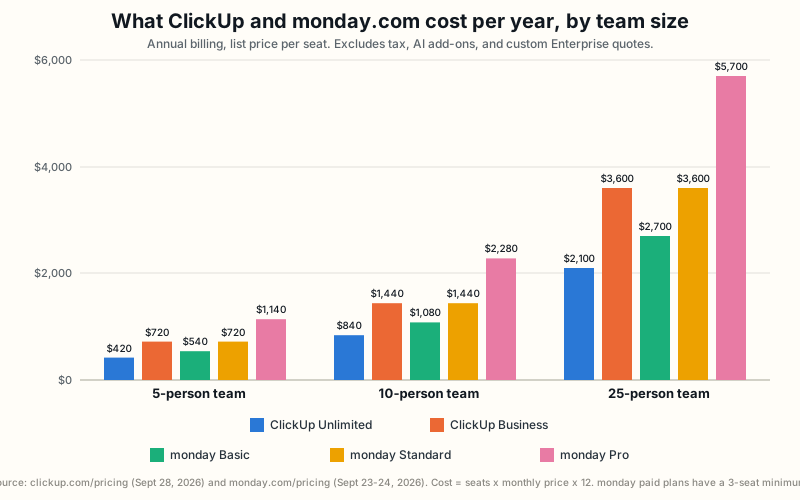
Figure: Yearly list-price cost by team size. Source: clickup.com/pricing (checked September 28, 2026) and monday.com/pricing (checked September 23 to 24, 2026). Excludes tax, AI add-ons, and Enterprise quotes.
ClickUp’s Business plan and monday’s Standard plan cost the same, $12 per user. That is the fairest head-to-head. At Business, ClickUp lists unlimited dashboards, unlimited automation rules, Google single sign-on, and 5,000 automation runs a month. At Standard, monday lists Timeline, Gantt, and calendar views, guest access, a dashboard that combines up to 5 boards, and 250 automation actions a month. The extra $7 for monday Pro buys time tracking, dependencies, 25,000 automation actions, and a 20-board dashboard.
Two seat rules matter. ClickUp’s pricing page states no minimum number of paid seats, though we could not read its help center to rule out a rule elsewhere. monday’s paid Work Management plans have a 3-seat minimum, per a monday support article checked by hand, and they are sold in seat buckets above that. We could not confirm the bucket size, so the monday totals above assume exact seat counts and a real quote could be higher. The monday pricing page also shows a calculator that defaults to 10 seats, which is a display setting and not a minimum. ClickUp’s pricing page describes a 30-day money-back guarantee.
What forces an upgrade
| First plan that includes it | ClickUp | monday |
|---|---|---|
| Guests (outside collaborators) | Unlimited (5 guest seats plus 2 per extra paid user); Free Forever guests can edit | Standard (guest access; edit rights not stated) |
| Gantt or timeline views | Unlimited (Gantt unlimited) | Standard |
| Native time tracking | Unlimited | Pro |
| Dependencies | Not stated by plan; page states no restriction | Pro |
| Unlimited dashboards | Business | No dashboard count stated; boards combined per dashboard rise from 1 to 50 by plan |
| Google single sign-on | Business | Not confirmed |
| Required two-factor sign-in | Business | Not confirmed |
| Portfolio-style project rollup | Not stated by plan | Enterprise |
| Custom roles, SAML, SCIM | Enterprise | Not confirmed |
Sources: clickup-pricing, monday-pricing, monday-seat-pricing
Integrations and portability: API, import, and export
An integration connects the tool to other software your team already uses. ClickUp’s integrations page says it connects to “over 1,000+ tools” for free, and names at least 28 built by ClickUp, including Slack, GitHub, HubSpot, Google Drive, Zoom, and Microsoft Teams. Those counts are ClickUp’s own claim and we did not count them. monday’s marketplace page shows no total when we opened it, so we cannot compare counts. That is a gap in what the page shows, not evidence that monday has few.
An API lets your own code or a tool like Zapier read and change data. ClickUp allows 100 calls a minute on Free Forever, Unlimited, and Business, and 10,000 a minute on Enterprise. Its authentication docs describe a personal token and an OAuth 2.0 flow. monday’s API reference says the API can read board data and import data from another source. Its pricing page lists 1,000 calls a day on Standard, 10,000 on Pro, and 25,000 on Enterprise. To compare, 100 calls a minute is up to 144,000 a day if used around the clock. A team that syncs data often should weigh this, and monday’s API changelog shows the API is actively updated.
Import is the clearest advantage for ClickUp. Its import page says it can bring in work from monday.com, where boards become a Folder or Space, and from Asana, Trello, Jira, Notion, Confluence, Todoist, Basecamp, Wrike, and CSV or Excel files. It says imports are free. It does not list which fields fail to carry over, so a test import is wise. For getting data out, neither vendor documents a full-account export in the pages we could read. ClickUp’s own glossary says its Admin role manages imports and exports, so an export path exists, but we could not confirm its details.
Sources: clickup-integrations, clickup-developer-docs, clickup-import-feature, monday-marketplace, monday-api-docs, monday-api-changelog, monday-pricing
Administration and security: permissions and governance
Both vendors hold independent audits. ClickUp’s security page names SOC 1 Type 2, SOC 2 Type 2, SOC 3, and ISO 27001, 27017, 27018, 27701, and 42001. monday’s trust center names SOC 1 Type II, SOC 2 Type II, SOC 3, ISO 27001, 27017, 27018, 27032, and 27701, plus CSA STAR and TX RAMP. GDPR, HIPAA, and similar entries are the vendors’ own compliance statements, not audits. ClickUp says its data is encrypted with TLS 1.2 in transit and AES-256 at rest, and hosted in the United States, Ireland, Australia, and Singapore, with a free region choice on Enterprise.
The controls that matter to an IT buyer sit on higher plans. ClickUp defines four built-in roles: Owner, Admin, Member, and Guest. Business adds Google single sign-on and required two-factor sign-in. Enterprise adds custom roles, Microsoft, Okta, and SAML sign-in, SCIM provisioning, and granular Space permissions. monday’s pricing page lists “multi-level permissions” and enterprise-grade security on Enterprise, private boards and docs on Pro, and guest access on Standard.
monday’s developer reference describes three board types (private, public, and share) and three roles that can be set through its API: contributor, viewer, and editor. It does not say which plan these need. We found no page naming a monday plan for single sign-on, so a buyer who requires it should ask monday in writing. We also could not read either vendor’s help center, so the full permission details of both tools are unconfirmed beyond what is stated here.
The safe approach is to write down the three controls you must have, such as single sign-on, guest limits, and audit needs, and check each against the plan you plan to buy before you commit.
Sources: clickup-security, clickup-developer-docs, clickup-pricing, monday-trust-center, monday-pricing, monday-developer-boards
Choose ClickUp if
ClickUp is the better choice for a team that wants many features at the lowest price per person and can spend time setting them up. It suits a small agency that wants tasks, docs, chat, forms, and billable time in one product. It suits a team that needs guests on a low plan, since ClickUp’s Unlimited plan includes guest seats and every paid plan adds unlimited read-only guests. It suits an IT buyer who needs Google single sign-on at $12 per user. It also suits a team moving from monday.com, since ClickUp documents a direct import.
ClickUp is a weaker choice for a team that wants a tool that is quick to explain to new staff, since its large feature surface takes ongoing tidying. It is also a weaker choice if AI is a core need and the budget is tight, because AI adds $7.20 or $22.40 per user per month billed yearly. It is a weaker choice for a team that needs a documented full-account export before it commits, because we could not confirm one.
Choose monday if
monday is the better choice for a team that wants to design its own layout. A sales pipeline, a content calendar, or a set of linked client and project boards fits its item, group, and column model well. It also suits a team that wants AI tools included in the plan price, since every paid plan bundles them. It suits a team that wants one dashboard across up to 20 boards on Pro, or one portfolio view on Enterprise.
monday is a weaker choice for a small team that needs Gantt, guests, and time tracking cheaply, because those features sit on Standard and Pro. It is a weaker choice for a team of 4 that wants to buy exactly 4 seats, because of the 3-seat minimum and unconfirmed seat buckets. And it is a weaker choice for a buyer who must confirm single sign-on on a specific plan without asking, since no page we read names one.
Scenario verdicts: which product wins
Each row names a common buying situation, the better fit, the reason, and the fact that would change the answer. One row is marked unsettled because the evidence we could read does not decide it. Read the rows that look most like your team, and check the reversal column before you commit.
| Scenario | Winner | Why | What would reverse it |
|---|---|---|---|
| 5-person team wants Gantt views and native time tracking at the lowest price | ClickUp | Unlimited is $420 a year; the monday plans with both cost $720 or $1,140 | The team needs neither feature and prefers monday’s board design |
| 10-person team wants AI included in the budget | monday | monday Standard is $1,440 with 5 AI tools; ClickUp Unlimited plus Brain AI is $1,704 | The team wants ClickUp’s specific AI features, or plans no AI use |
| Agency wants docs, chat, forms, and billable time in one place | ClickUp | Its feature pages describe all four in one product | The agency already has chat elsewhere and wants a simpler board tool |
| Team wants custom columns, linked boards, and a 20-board dashboard | monday | Boards use 25+ column types with links and mirrors; Pro combines 20 boards | The team accepts ClickUp’s fixed Space, Folder, and List structure |
| IT buyer needs Google single sign-on and required two-factor at the lowest plan | ClickUp | Both features start on ClickUp Business at $12 per user | A monday sales reply names a cheaper plan for single sign-on |
| Team needs frequent API syncing at a middle-tier price | Unsettled | 100 calls a minute versus 10,000 a day on Pro use different units | Measuring the team’s real call volume against both limits |
Migration and lock-in
Moving into ClickUp is documented. Its import page describes monday.com boards converting into a Folder or Space, and it lists other named sources. It does not say which fields survive, so a team should import one board first and check custom columns, files, and comments before moving everything. Moving into monday is less clear: monday’s API reference says it supports importing data from another source programmatically, which suits a technical team or a partner, but we found no import wizard described.
Moving out is the weaker side for both. We found no documented full-account export for either product. ClickUp’s Admin role manages imports and exports, and monday’s API can read board data, but the pages that would describe a board-level export returned access errors. This is a gap in what we could read, not a confirmed absence. Lock-in also comes from structure: the more a team builds with linked boards, mirrored columns, automations, or Space hierarchies, the more work it takes to rebuild elsewhere.
A practical safeguard is to test an export from a small project during the trial period, and to keep a dated copy of key data outside either tool.
Sources: clickup-import-feature, clickup-developer-docs, monday-api-docs
Limitations and methodology
This comparison uses only pages published by ClickUp and monday.com, checked in September 2026: pricing pages, feature pages, security pages, developer documentation, and product-update pages. Prices and limits change, so each figure carries a date. We did not test either product by hand, so nothing here says how either tool feels to use.
Several facts could not be confirmed. Both vendors’ help centers returned access errors to automated review, so detailed permission rules and export steps are unconfirmed. We could not confirm which plan includes ClickUp Portfolios, Goals, or dependencies, or what Trial means on ClickUp dashboards. We could not confirm monday’s seat-bucket size, its single sign-on plan, or whether it offers a workload view. Missing information is left unscored and is not treated as a weakness.
The short scores attached to this page summarize the differences above and do not replace them. Read the full ClickUp review or the full monday.com review for each product alone, and see our methodology page for how we source claims.
Frequently asked questions
Is ClickUp cheaper than monday.com? Yes on list price, before AI. ClickUp Unlimited is $7 per user per month billed yearly and monday Basic is $9. If you add ClickUp’s Brain AI at $7.20 per user billed yearly, ClickUp can cost more than monday’s Standard plan.
Do both have a free plan? Yes. ClickUp’s Free Forever has unlimited members and tasks, with 60MB of storage and 5 Spaces. monday’s free plan allows up to 2 seats and 3 boards, and includes no AI features.
Does monday have a minimum number of seats? Yes. A monday support article states a 3-seat minimum on paid Work Management plans. ClickUp’s pricing page states no minimum.
Which one has Google single sign-on? ClickUp lists Google single sign-on on Business and Enterprise. We found no monday page naming a plan for single sign-on, so ask monday directly.
Can I move from monday.com to ClickUp? ClickUp says it can import monday.com boards into a Folder or Space. It does not list which fields carry over, so test one board first.
Which is better for an agency? ClickUp’s pages describe docs, chat, forms, and billable time tracking together, which suits client work. monday can suit an agency that wants its own board design and included AI. See the scenario table above for the reversal conditions.